This is the message type used to assign fee setting to message.
Parameters
The message type contains the following parameters:
| Name | Type | Required | Description |
|---|---|---|---|
| fee_name | string | true | Fee setting |
| msg_type | string | true | Message type |
| issuer | string | true | Issuer account address |
Example
{
    "type": "fee/assignFeeToMsg",
    "value": {
        "fee_name": "double",
        "msg_type": "bank-send",
        "issuer": "mxw1k9tr2cukhfvlhj356e5eur28kuw3p6a4l93h59"
    }
}
Handler
The role of the handler is to define what action(s) needs to be taken when this MsgAssignFeeToMsg message is received.
In the file (./x/fee/handler.go) start with the following code:
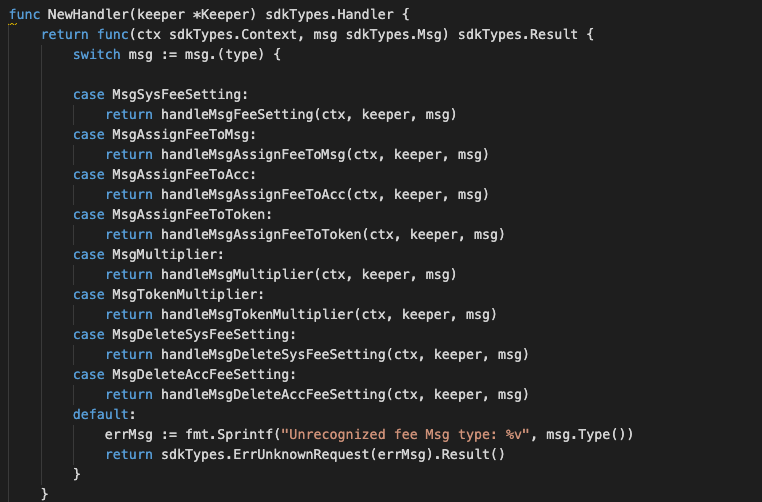
NewHandler is essentially a sub-router that directs messages coming into this module to the proper handler. Now, you need to define the actual logic for handling the MsgAssignFeeToMsg message in handleMsgAssignFeeToMsg:
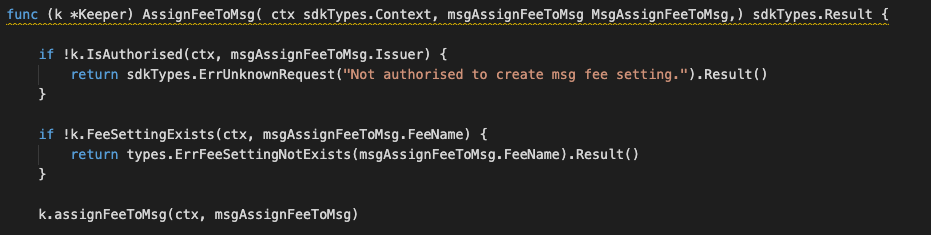
In this function, requirements need to be met before emitted by the network.
- Issuer must be authorised user.
- Duplicated Fee setting is not allowed.
Events
This tutorial describes how to create maxonrow events for scanner on this after emitted by a network.

Usage
This MakeMxwEvents create maxonrow events, by accepting :
- Custom Event Signature : using CreatedTxFeeSetting(string,string)
- Signer
- Event Parameters as below:
| Name | Type | Description |
|---|---|---|
| signer | string | Account address |
| msgtype | string | Message type |